Published
Category
Alby Hub
Transaction Labeling in Alby Hub
Transaction labeling in Alby Hub for seamless and error-free bitcoin bookkeeping and clean accounting.

Why Transaction Labeling Matters
If you’ve been using bitcoin for a while, you already know: transactions don’t all look the same.
They range from large, infrequent payments to high volumes of tiny micropayments. That flexibility is one of bitcoin’s biggest strengths. But it also creates a real challenge when it comes to bookkeeping. A handful of large transactions is easy to track. Hundreds (or thousands) of small ones? Not so much.
On top of that, Bitcoin payments over the lightning are private by design. That’s great for users, but it also means you don’t automatically get the structured context that traditional financial systems often provide. Without additional metadata, it can quickly become difficult to answer simple questions like:
What was this payment for?
Who was it to?
How should I categorize it for accounting?
For businesses using Alby Hub, this becomes especially important. Clean, structured data is essential for accurate bookkeeping, tax reporting, and financial analysis.
That’s why we added transaction labeling.
How Transaction Labeling Works in Alby Hub
Transaction labeling in Alby Hub is designed to be both flexible and simple.
Instead of forcing you into a rigid structure, labels let you define your own system based on how you already run your accounting or how your accountant expects data to be structured.
You can attach multiple labels to each transaction, allowing you to capture all relevant information at the moment the transaction happens.
This has a few immediate benefits:
You don’t have to reconstruct context later
You reduce the risk of misclassification
You create consistency across your records
You make exports directly usable in accounting tools
In short: you move the work from “after the fact” to “at the moment it actually happens” which is both faster and more accurate.
What this Looks like in Practice
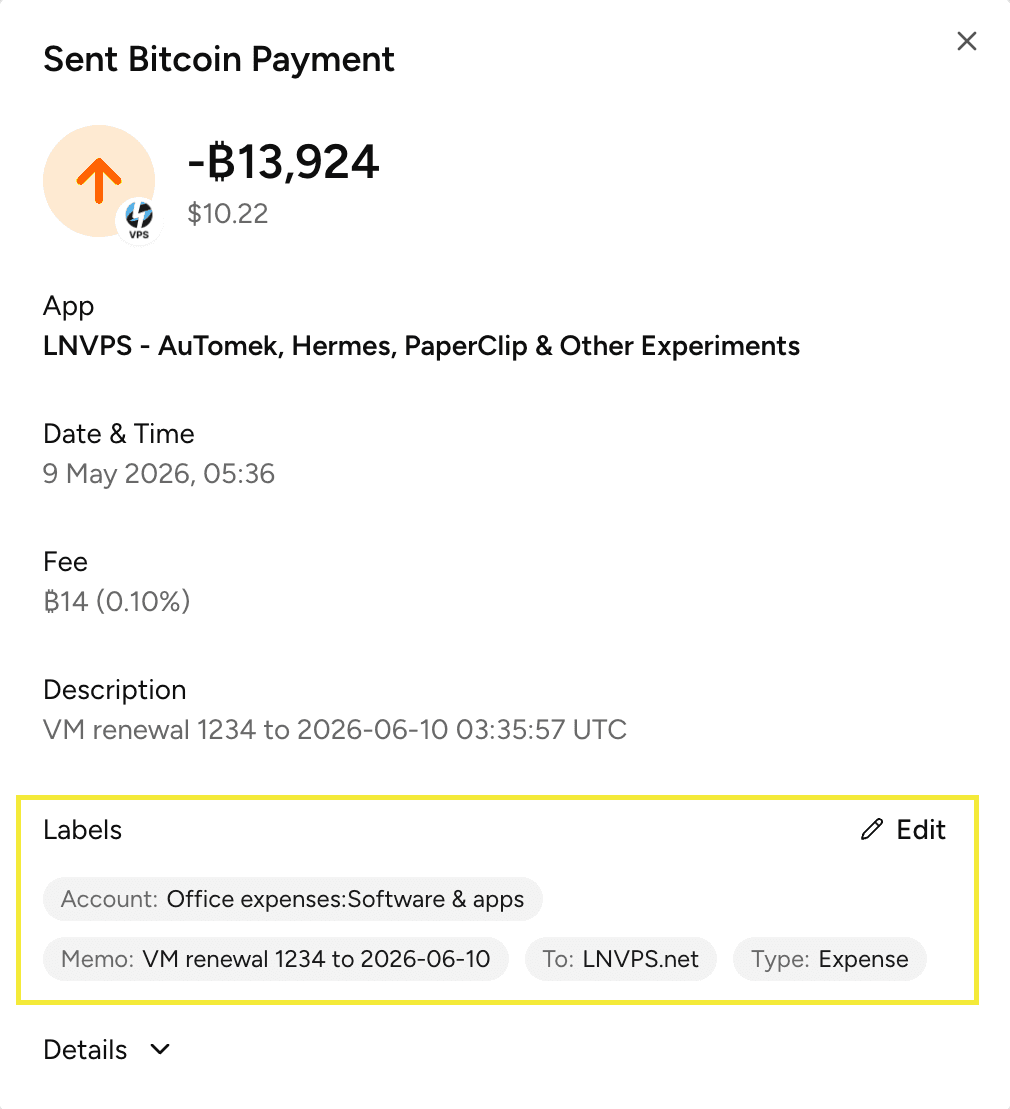
At Alby, we use QuickBooks for bookkeeping and accounting. With transaction labeling in Alby Hub, we’ve aligned our labels directly with how data is structured in our accounting system.
1) Transaction Type
We label each transaction based on its nature:
Expense
Transfer
Sales Receipt
2) Account
We match this to our chart of accounts in QuickBooks (e.g. general software expenses, cloud infrastructure expenses, subscription income).
3) From / To
We map counterparties to vendors or customers in QuickBooks (e.g. lnvps.net)
4) Memo
We add a short description of what the payment was for, including useful details like:
Time period (e.g. “April 2026”)
Invoice number
Purpose of the expense
Example Labels
Importing Becomes Plug-and-Play
Once transactions are labeled consistently, exporting them becomes much more powerful.
Instead of a raw list of payments, you get structured data that can be imported into your accounting system with minimal cleanup.
Example export

The Result: Less Guesswork, Fewer Errors
Before labeling, bookkeeping often meant going back through transactions and trying to reconstruct context like searching through emails and guessing what a payment was for.
Now, that work is done upfront. When creating or receiving a transaction, you add the relevant labels immediately. By the time you export the data, everything is already categorized and complete.
The result:
Hours saved during bookkeeping cycles
Significantly fewer errors
Cleaner, more reliable financial data
Try it Out
Transaction labeling turns Alby Hub into a much more powerful tool for anyone who needs to stay on top of their finances, especially businesses dealing with high volumes of bitcoin transactions.
This addition makes a big difference on the time spent consolidating your finances.
We’re already feeling it internally: for the first time, bookkeeping feels less like a chore and more like a smooth, predictable process.
Give it a try in your own Alby Hub and let us know how it works for you and what we can improve next.